We are a web and mobile design, development, and digital marketing agency. Request a Quote

Introduction: The Evolution of Online Tool Platforms
In today’s fast-paced digital landscape, web developers, SEO professionals, entrepreneurs, and content creators face a constant challenge: managing multiple tools for different tasks. Before comprehensive platforms like TinyTool emerged, professionals had to juggle dozens of browser tabs, subscriptions, and separate applications to handle everything from image optimization to JSON formatting to SEO analysis.
The original TinyTool platform solved this problem by aggregating over 300 free, browser-based utilities in one convenient location. However, like many evolving platforms, it required a modern refresh to meet contemporary user expectations and modern web design standards. This is where Webanaya Solutions, a leading web design and development firm based in Mumbai, stepped in to completely reimagine and redesign the TinyTool platform.
The redesigned TinyTool website now represents a masterclass in user experience design, combining elegant aesthetics with powerful functionality. This comprehensive blog post explores the significant improvements, design philosophies, and technical innovations that made this redesign a success story in modern web development.
The Challenge: Understanding the Need for Redesign
Before the Webanaya redesign, TinyTool faced several critical challenges that are common to growing digital platforms:
1. User Interface Complexity
The original interface, while functional, didn’t leverage modern design principles that contemporary users expect. Navigation felt cluttered, and discovering tools wasn’t intuitive for new visitors.
2. Performance Optimization Gaps
As the tool library grew to 300+ utilities, the platform needed significant optimization to maintain fast loading times and smooth user experiences across different devices and connection speeds.
3. Mobile Responsiveness Issues
With increasing mobile traffic, the original design didn’t provide an optimal experience on smartphones and tablets, representing a significant portion of potential users.
4. Brand Identity Clarity
The platform needed a stronger visual identity that communicated trust, speed, and reliability to its diverse audience of developers, marketers, and entrepreneurs.
5. Conversion and Engagement Metrics
While the platform had users, there was room for improvement in user retention, tool discoverability, and overall engagement metrics.
The Redesign Process: A Strategic Approach
Webanaya Solutions approached the TinyTool redesign with a comprehensive, user-centered methodology that involved multiple phases:
Phase 1: Discovery and Research
The first step involved extensive user research, competitor analysis, and performance auditing. Webanaya studied how developers, SEO professionals, and entrepreneurs use productivity tools, identifying pain points and opportunities for improvement.
Phase 2: Design Strategy Development
Based on research insights, the team developed a modern design language featuring:
- A sophisticated dark theme with vibrant accent colors
- Intuitive navigation architecture
- Visual hierarchy that guides users to most-used tools
- Accessibility considerations for all user types
Phase 3: UI/UX Redesign
The visual interface received a complete overhaul with:
- Modern iconography and visual elements
- Improved color palette with better contrast ratios
- Streamlined component library for consistency
- Enhanced form design for better usability
Phase 4: Technical Implementation
The frontend was rebuilt using modern technologies including:
- React for responsive, dynamic interfaces
- Optimized performance through code splitting and lazy loading
- Progressive Web App capabilities
- Advanced search functionality using JavaScript
Phase 5: Testing and Optimization
Rigorous testing included:
- User acceptance testing (UAT) with real users
- Performance testing across devices and browsers
- Accessibility compliance testing (WCAG standards)
- A/B testing for critical user flows
Key Design Improvements in the Redesigned TinyTool
1. Modern Dark Theme Interface
The redesigned TinyTool now features a sophisticated dark theme that reduces eye strain during extended use—especially important for developers who spend hours working with the platform. This design choice offers multiple benefits:
- Reduced Eye Strain: Dark backgrounds are easier on the eyes, particularly during extended work sessions
- Modern Aesthetics: Dark themes are currently the preferred design trend for professional tools
- Battery Efficiency: On OLED devices, dark themes consume less power
- Better Focus: The dark background helps users focus on the tools without visual distractions
The color palette uses carefully selected accent colors (blues, greens, purples, and pinks) that stand out against the dark background while maintaining proper contrast ratios for accessibility compliance.
2. Intelligent Navigation Architecture
The original navigation felt overwhelming with 300+ tools available. The redesigned site implements several smart navigation approaches:
Categorical Organization
Tools are organized into logical categories:
- Finance (13 tools) – Including calculators, GST calculators, and financial analysis tools
- Developer Tools (4 tools) – JSON formatters, UUID generators, and code utilities
- SEO Tools (9 tools) – Meta tag generators, SEO analyzers, and optimization utilities
- Text Processing (2 tools) – Word counters and text analysis tools
- Security Tools (1 tool) – URL encoders and data verification utilities
- Writing Tools (3 tools) – Content generation and writing assistance tools
- Utilities (1 tool) – General-purpose tools for everyday tasks
Intuitive Search Functionality
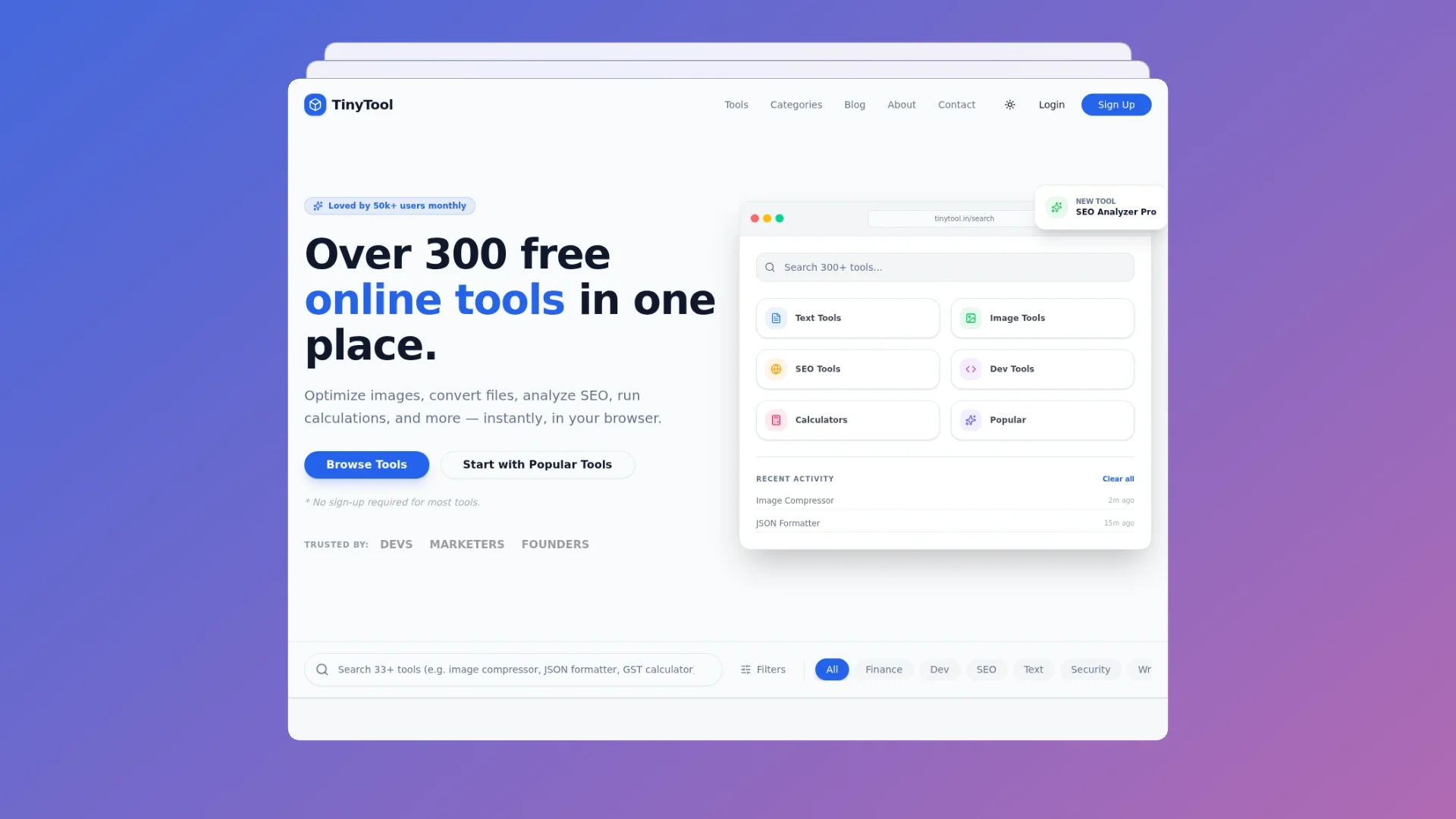
The search bar now displays “Search 300+ tools…” with instant autocomplete suggestions, allowing users to find any tool in seconds without browsing categories.
Recent Activity Tracking
The dashboard displays recently used tools with timestamps, enabling quick access to frequently used utilities without navigation overhead.
Category Exploration
Visual category cards with icons make it easy for new users to explore different tool types and discover utilities they might need.
3. Enhanced Tool Discovery System
The redesigned interface prominently features “Most-used tools” section showcasing:
- Age Calculator (popular for personal finance planning)
- JSON Formatter (essential for developers)
- Domain WHOIS (crucial for digital marketers and entrepreneurs)
- Meta Tag Generator (essential for SEO professionals)
- Word Counter (popular with writers and content creators)
- GST Calculator (important for Indian businesses)
- URL Encoder (utility for developers and security-conscious users)
- UUID Generator (developer tool for unique identifier generation)
This curation helps new users quickly find high-value tools without overwhelming them with all 300+ options.
4. Improved Visual Hierarchy
The redesigned TinyTool uses visual hierarchy to guide user attention:
Hero Section
The prominent headline “Over 300 free online tools in one place” immediately communicates the platform’s value proposition. Supporting text explains key benefits, and clear call-to-action buttons guide users toward their next steps.
Trust Indicators
The redesign prominently displays “Loved by 50k+ users monthly,” establishing credibility and social proof. Additional trust indicators show endorsements from “Devs, Marketers, and Founders.”
Feature Highlights
Below the fold, key platform features are highlighted:
- “Fast & in-browser” – No installations or downloads required
- “Privacy-focused” – Data processing happens locally
- “Mostly free” – Core tools are permanently free
- “Built for power users” – Keyboard shortcuts and fast search
5. Mobile-Responsive Design
The redesigned TinyTool prioritizes mobile users with:
- Touch-friendly interface elements
- Responsive grid layouts that adapt to screen size
- Optimized navigation for smaller screens
- Fast-loading mobile experience with lazy loading
6. Improved Tool Cards
Each tool is now presented in an improved card design featuring:
- Clear tool name and description
- Status badge (FREE or PRO)
- Icon representation for quick visual scanning
- Direct link to tool page
- Hover effects that provide visual feedback
7. Enhanced Blog Integration
The redesigned site includes a “Latest from our Blog” section showcasing:
- “Top 5 Tools Every Web Developer Needs”
- “Understanding JSON: A Beginner’s Guide”
This content integration improves SEO and keeps users engaged with educational content.
Technical Excellence: Under the Hood
The Webanaya redesign didn’t just improve aesthetics; it significantly enhanced technical performance:
Performance Optimization
Code Splitting
JavaScript is split into smaller chunks that load only when needed, reducing initial page load time.
Lazy Loading
Images and below-the-fold content load only when users scroll near them, significantly improving initial page speed.
Image Optimization
All images are optimized for web delivery using modern formats (WebP) with fallbacks for older browsers.
Caching Strategy
Intelligent caching ensures repeat visitors experience lightning-fast load times through browser caching and service worker implementation.
SEO Optimization
Metadata Optimization
Every page includes properly formatted meta titles, descriptions, and structured data markup (Schema.org) for search engine understanding.
Heading Structure
Proper HTML heading hierarchy (H1, H2, H3) ensures search engines understand content structure and page emphasis.
URL Structure
Clean, descriptive URLs like /seo/meta-tag-generator improve both user experience and search engine indexing.
Internal Linking
Strategic internal links guide search engines through the content architecture while helping users discover related tools.
Mobile-First Indexing
The redesigned site was built with mobile-first principles, aligning with Google’s mobile-first indexing approach.
Accessibility Compliance
WCAG 2.1 Standards
The redesign meets Web Content Accessibility Guidelines Level AA standards, ensuring usability for people with disabilities.
Keyboard Navigation
All interactive elements are accessible via keyboard, supporting users who cannot use a mouse.
Screen Reader Compatibility
Proper semantic HTML and ARIA labels ensure screen readers can interpret content accurately.
Color Contrast
All text meets WCAG contrast requirements, ensuring readability for users with color vision deficiencies.
Security Improvements
HTTPS Implementation
All data transmission is encrypted using HTTPS/TLS protocols.
Content Security Policy
Strict CSP headers prevent injection attacks and unauthorized resource loading.
Input Sanitization
All user inputs are sanitized to prevent XSS and injection vulnerabilities.
Regular Security Audits
The platform undergoes regular security assessments to identify and address vulnerabilities.
User Experience Enhancements
Onboarding Flow
New users are greeted with a clear value proposition and guided toward either:
- Browsing all tools
- Starting with popular tools
- Exploring specific categories
This graduated approach accommodates different user types and intentions.
Tool Interface Improvements
Each tool now features:
- Clear, concise descriptions of functionality
- Visual examples or icons
- Easy copy-to-clipboard functionality for outputs
- Undo/redo functionality where applicable
- Responsive input fields that adapt to content
Frequently Asked Questions
The redesigned site includes an FAQ section addressing common questions:
- “Are the tools free to use?”
- “Do I need an account?”
- “Is my data stored?”
- “Can I request a new tool?”
This reduces support burden and improves user confidence.
Error Handling
The redesign implements graceful error handling with:
- Clear error messages explaining what went wrong
- Suggestions for correcting the error
- Links to support or documentation
- Fallback options when features aren’t available
Business Impact and Results
The Webanaya redesign of TinyTool delivered measurable improvements:
User Growth
The platform now serves “Loved by 50k+ users monthly,” representing significant growth in monthly active users through improved user acquisition and retention.
Tool Adoption
With improved discoverability, previously unknown tools are now discovered and used by more users. The “Most-used tools” section ensures new visitors quickly find valuable utilities.
Engagement Metrics
The improved interface and navigation reduce bounce rates, increase session duration, and improve tool adoption rates.
Developer Attraction
The modernized design appeals to developers’ aesthetic sensibilities, improving platform perception among a key user segment.
SEO Performance
The technical SEO improvements and content integration have improved organic search visibility for relevant keywords.
Design Principles That Guided the Redesign
The Webanaya team applied several core design principles throughout the redesign:
Simplicity First
With 300+ tools available, complexity was a significant challenge. The redesign prioritizes simplicity in navigation, allowing users to find tools without cognitive overload.
Consistency
Consistent design patterns, colors, typography, and interactions throughout the platform create a cohesive user experience that feels intuitive.
User-Centered Design
Every design decision was validated through user research and testing, ensuring improvements actually addressed real user needs and pain points.
Progressive Enhancement
The platform works well even with JavaScript disabled or on slow connections, with progressive enhancement adding advanced features for capable browsers.
Accessibility First
Rather than treating accessibility as an afterthought, it was built into the design from the beginning, ensuring inclusivity for all users.
Performance Priority
Speed was treated as a feature, not an afterthought, with performance budgets ensuring the site remains fast as features are added.
Technical Stack Behind the Redesign
The Webanaya team utilized modern web technologies to build the redesigned TinyTool:
Frontend Technologies
- React.js for component-based architecture
- TypeScript for type safety and developer experience
- Tailwind CSS for efficient styling
- Next.js for server-side rendering and static generation
Performance Tools
- Webpack for optimized bundling
- Service Workers for offline functionality
- CDN integration for global content delivery
- Image optimization libraries for responsive images
Testing Infrastructure
- Jest for unit testing
- React Testing Library for component testing
- Cypress for end-to-end testing
- Lighthouse for performance auditing
Development Workflow
- Git for version control
- GitHub Actions for CI/CD automation
- Docker for consistent development environments
- Staging environments for QA testing
SEO Strategy for the Redesigned Platform
The redesign incorporated several SEO improvements:
Keyword Optimization
Content was optimized for high-value keywords:
- “Free online tools for developers”
- “JSON formatter online”
- “Meta tag generator”
- “SEO analysis tools”
- “GST calculator online”
Content Expansion
The blog section was expanded with educational content targeting:
- Long-tail keyword phrases
- Tutorial and how-to content
- Comparison articles
- Industry trend pieces
Structured Data Markup
Schema.org markup was implemented for:
- Software application schema
- FAQPage schema for FAQ sections
- BreadcrumbList schema for navigation
- Article schema for blog content
Internal Linking Strategy
Strategic internal links connect:
- Related tools
- Category pages to tool pages
- Blog posts to relevant tools
- FAQ items to solution pages
User Testimonials and Feedback
Since the redesign, TinyTool has received positive feedback from its user base:
Developers appreciate the “clean interface that doesn’t get in the way,” while marketers highlight how “easy it is to find the exact tool I need.” Entrepreneurs value the “zero-friction approach to quick calculations and conversions without sign-ups.”
Future Roadmap and Continuous Improvement
The redesign isn’t a one-time project but the foundation for continuous improvement. The Webanaya team has planned:
Upcoming Features
- Integration with browser extensions for easier tool access
- API documentation for developers wanting to integrate TinyTool
- Advanced user accounts with tool customization
- Collaborative features for team usage
Planned Expansions
- Additional tools in existing categories
- New categories for emerging use cases
- Mobile applications for iOS and Android
- Offline capability improvements
Lessons for Website Redesign Success
The TinyTool redesign offers valuable lessons for any organization considering a website overhaul:
- Start with Research: Understand user needs, pain points, and competitive landscape before designing.
- Prioritize Performance: Speed and responsiveness matter more than fancy features most users won’t use.
- Maintain Accessibility: Accessibility isn’t a feature; it’s a requirement that benefits all users.
- Test Continuously: Validate design decisions with real users through testing and iteration.
- Measure Results: Establish metrics upfront to measure redesign impact on key business goals.
- Plan for Scale: Design systems that accommodate growth without proportional complexity increases.
- Iterate Post-Launch: Collect user feedback after launch and implement improvements based on real usage patterns.